Copy To Read-Text To Speech APK

Copy To Read - Text to Speech icon

Copy To Read

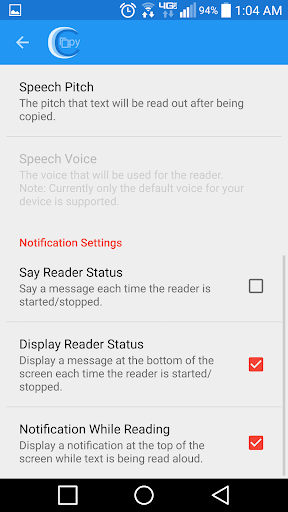
Copy To Read - Text to Speech screenshots 1 Copy To Read - Text to Speech screenshots 2 Copy To Read - Text to Speech screenshots 3 Copy To Read - Text to Speech screenshots 4 

The description of Copy To Read - Text to Speech

Don't want to read things yourself?

With Copy To Read - Text to Speech, simply copy some text, then listen as the text you copied is read back to you through the text to speech. This text reading app can read text from any app, as long as the app grants you the ability to copy the text that you want to be spoken. It couldn't be any easier to have text spoken aloud to you. No need to import text into an app to have it read to you. While the text is being read to you, a notification will be displayed that you can tap on to stop reading at any time or tap the pause button to pause reading. You can also click the skip forward and backward buttons on the notification to skip through sentences within the text you copied. So no need to worry about accidentally copying text that you don't want to be spoken to you through the text to speech.

                How to use Copy To Read - Text to Speech?

Option 1 (Android 4.1+):
1. Start the Copy To Read Service (flip the toggle switch in the app or use the widget)
2. Copy some text to your clipboard (from any app)
3. Sit back and listen as the text you copied is read out loud by your phone to you

Option 2 (Android 6.0+) - Using a floating "Speak" button like in iOS:
1. Highlight some text by holding your finger down on it (from within any app)
2. Tap the "Speak" button within the floating menu (the menu that contains the copy button)
3. Sit back and listen as the text you highlighted is read out loud by your phone to you
- Note: this method only supports reading text up to 1000 characters long due to a limitation in the Android framework. Sorry.

Want to make Copy To Read - Text to Speech automatically start and stop the reader service when you connect to a certain Wi-Fi network or Bluetooth device?

- You can accomplish this through using the app called Trigger or the app called Tasker (See below for instructions on using these methods). 

Instructions for using Trigger:
1. Add a new task
2. Set your trigger type
3. Click the add new task button
4. Select "Open Activity" task under the "Applications & Shortcuts" section
5. Click next
6. Select application: Copy To Read
7. Select activity: StartReaderActivity or StopReaderActivity

Instructions for using Tasker:
1. Build a new profile that triggers using the type of event that you want (Wi-Fi/Bluetooth/other)
2. Link the profile to a new task
3. In the new task add a "Launch App" action under the "App" section
4. Find the Copy To Read app and hold down your finger on it for a few seconds
5. When the new dialog window appears to select the StartReaderActivity or StopReaderActivity

Comments

Popular posts from this blog

UC Browser Mini -Tiny Fast Private & Secure APK

UC Browser Mini UCWeb Inc Download APK  (12 MB)       The description of UC Browser Mini -Tiny Fast Private & Secure You are about to download the  UC Browser Mini 11.5.2 apk file  for Android 4.0 and up  Brand new menu, fast browsing, speed up your download, with night mode and incognito browsing  ... Please note that the UC Browser Mini apk file v11.5.2 is the original apk file obtained from the official Google Play server. It DOES NOT contain any mod, cheat, cracks or unlimited gold patch. You could now read more about UC Browser Mini app, review app permissions or choose a server to  download it The UC Browser Mini 11.5.2 apk file (Require Android: 4.0 and up, Architecture: armeabi) you are to download is hosted on the  APK4Fun  server. This is the official APK4Fun download server. Now  click here  to download the apk file of UC Browser Mini 11.5.2 A...

Mobizen Screen Recorder for Samsung No Root APK

Mobizen Screen MOBIZEN Download APK  (23 MB)       The description of Mobizen Screen Recorder for SAMSUNG The Screen Recorder you were looking for! ▶Recepient of Google's  ‘Best of 2016 Apps’  Award. ▶The Screen Recorder Chosen by 70 million users worldwide. ▶ Featured by Google Play store -----Featured in many markets, such as Korea, USA, Europe, Japan, North America, South America, etc. How to Make the Perfect First Video? Mobizen Screen Recorder for Samsung version 3.6.2.8 release notes > ver. 3.6.2.8 🌿Various Stability Improvements and Bug Fixes 👍Thanks to all MobiCrew members for your love and support

Zapya Apk

Zapya By  DewMobile, Inc.   (no ratings)   Download APK (9.3 MB) More about Zapya Download Zapya APK v5.6.5 (US). With Zapya app you are not going to need internet to share files ever again. Zapya frees Android, iOS as well as PC users to share and transfer files from one device to another without use of Wi-Fi or any mobile data. Using Zapya is easy and simple and it does not cost anything except some battery power. The app is supported in 20 languages and makes the file transfer easier than veer. You can now share files to the people around you via the following three ways of the app. Creating a grouping and inviting others to join Generation of a personalized QR code for other users to scan Send files to people nearby Files can be transferred and shared easily without any use of cables or without any cost. Files of varying sizes can be sent to multiple platforms. Features: Following are so...